
This page will guide you through the New Organization Provisional Process, including required trainings, documentation, sustainability goals and the final consultation needed to advance your organization from provisional to active status.
Should you have any questions or need assistance completing any part of this process, please contact Student Involvement at 205-348-6114 or uainvolvement@ua.edu.
InfoDuring Your Provisional Period
New organizations cannot host events requiring registration while in provisional status. During your provisional period you can:
- Hold meetings (no food)
- Register for Student Involvement Events (i.e. Get On Board Day, Organization Take Over, Organization Take Over Tuesdays).
- Table inside (no food or giveaways, just informational material)
Steps to Complete the Provisional Process
To successfully complete the New Organization Provisional Process, you will need to access the New Organization Provisional Path in mySOURCE and the Source Student Org Trainings course in Blackboard.
All officers will have access to the Blackboard course, though it may appear near the bottom of their course listings. Only the organization’s primary contact will receive access to the New Organization Provisional Path. The primary contact is responsible for uploading documentation showing that all requirements have been completed.
All required documentation must be uploaded through the Provisional Path. If documentation is not properly submitted, the organization will remain in provisional status and will not advance to active, registered status. The organization may also be required to restart the New Organization Process.
Step 1: Complete New Organization Workshop (NOW)
The New Organization Workshop is required for each member of your executive board, including the President, Vice President and Treasurer.
- Go to Blackboard and open the course titled Source Student Org Trainings.
- Select NOW and complete Organization 101.
- Complete the quiz and earn a passing score of 75% or higher.
- Once the president, vice president and treasurer have each earned a passing score, take a screenshot of each officer’s quiz results — each screenshot must include the student’s name, the date the quiz was taken and the quiz score. Submissions missing this information will be denied.
- Log in to mySOURCE.
- Select the circle icon in the top-right corner, then select Paths.
- On the My Paths page, select New Organization Provisional Path from the dropdown menu.
- Select Trainings, then select the quiz for which you are uploading the screenshot.
- Select the workshop completion quiz option.
- Upload the screenshots showing the completed quizzes for the president, vice president and treasurer.

Step 2: Complete Event Smart Training
Once your organization achieves active status, one officer must complete Event Smart training before registering events. This should be the officer responsible for submitting events on behalf of the organization. The training covers current UA policies and procedures for student organization events.
- Go to mySOURCE and search Events for Event Smart Training.
- Register for either an in-person or virtual Event Smart Training session.
- Have the officer who will submit events on behalf of the organization complete the training.
- Complete the quiz and earn a passing score of 90% or higher.
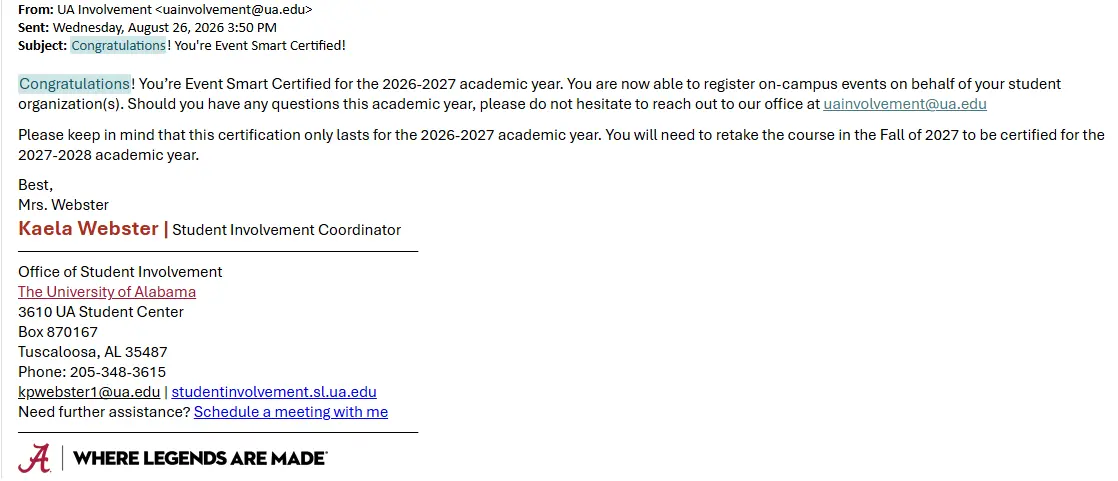
- Once you receive the completion confirmation email, take a screenshot of the email — screenshot must include the student’s name, the date the email was sent and the name of the person who sent the email. Submissions missing this information will be denied.
- Log in to mySOURCE and select the circle icon in the top-right corner, then select Paths.
- On the My Paths page, select New Organization Provisional Path from the dropdown menu.
- Select Trainings, then select Event SMART.
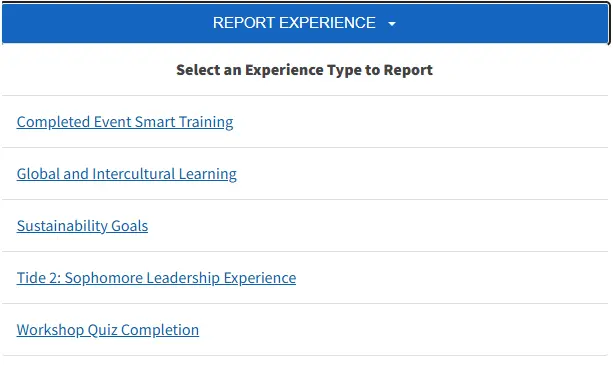
- Select the blue Report Experience button.
- From the dropdown menu, select Completed Event Smart Training and upload your screenshot.
Step 3: Submit Sustainability Goals
As an executive board, create three sustainability goals focused on the long-term growth and success of your organization. Consider using the SMART goal framework to make your goals specific, measurable, achievable, relevant and time-bound.
Your goals should be thoughtful and clearly demonstrate how your organization plans to grow and maintain long-term success. Goals that lack sufficient thought or effort will be denied.
Only the organization’s primary contact should submit the sustainability goals. To submit your goals:
- Log in to mySOURCE.
- Select the circle icon in the top-right corner, then select Paths.
- On the My Paths page, select New Organization Provisional Path from the dropdown menu.
- Select Goals, then select Sustainability Goals Form Completion.
- Select Report Experience, then select Sustainability Goal to submit your goals.
InfoComplete Trainings Before Submitting Goals
Do not complete this step until the president, vice president and treasurer have each completed the training requirements listed above.
Step 4: Attend New Organization Final Consultation
After reviewing your sustainability goals, the SOURCE Director will contact you to schedule a final new organization consultation with your executive board.
During the consultation, the SOURCE Director will review your documents, answer any remaining questions about becoming an active student organization and explain the final steps for completing your organization’s registration.
Before your final consultation, be prepared to provide the following:
Final Constitution
Bring a final draft of your organization’s constitution that includes the updated Non-Discrimination Clause.
Child Protection and Hazing Policy Form
Bring a completed form signed by the organization’s president, vice president and advisor.
Student Roster
Bring a roster of at least 10 UA students that includes their Crimson email addresses.